
A new Rejected Payments Report has been added to provide visibility into payments that have been rejected by the bank. The report displays rejected payments along with the rejection reason, where available.
Why this matters
This enhancement helps users quickly identify failed payments, understand the reason for rejection, and take appropriate action to resolve payment issues more efficiently.
Where to find it
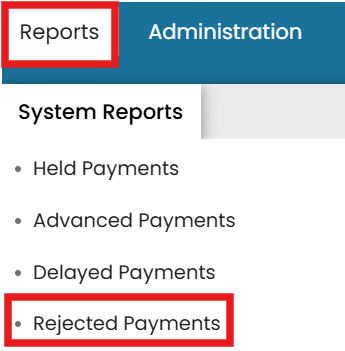
Payroll Site Homepage → Administration → Reports Dropdown → System Reports Tab → Rejected Payments
## Article: Documents
Common questions
How do I view rejected payments reports?
A new Rejected Payments Report has been added to provide visibility into payments that have been rejected by the bank.