
MMV supports both Sub-Vessels (full module access under your subscription) and Tenders (limited scope). Choose based on how you'll use the added vessel.
Add a Sub-Vessel
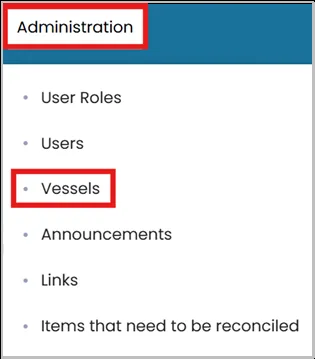
- Click the Administration tab and Select Vessels.
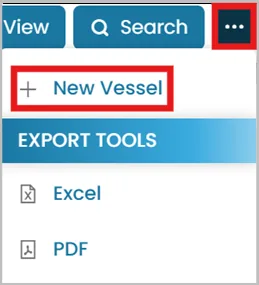
- Click the three dots and select New Vessel.
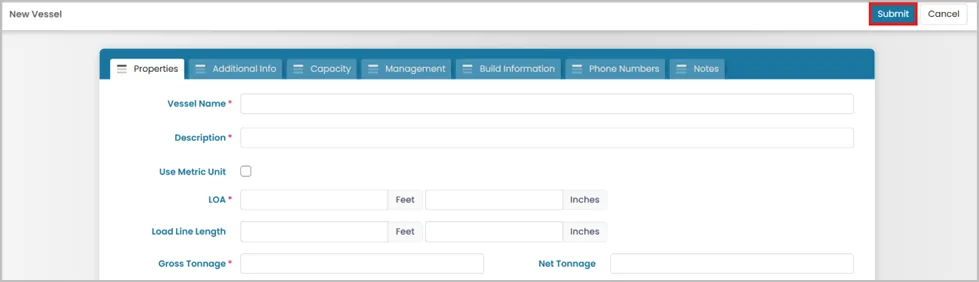
- Enter the required vessel details then click Submit.
Sub-Vessel includes full access to modules available on your subscription plan.
- Crew Management: Create Crew and Users; manage with Crew Planner and Hours of Rest.
- Documents: Upload Vessel and Crew Mandatory Documents, including Safe Manning.
- Maintenance & Equipment: Create Planned Maintenance schedules; track equipment.
- Vendors & Jobs: Manage Vendors and Vendor Jobs.
- Trips & Guests: Plan itineraries and guest records.
- Inventory & Contacts: Maintain separate lists.
ADDING TENDER
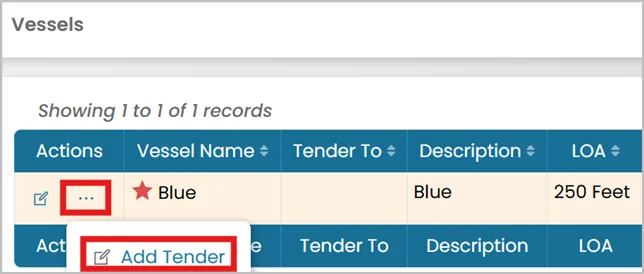
- Click the three dots next to the main vessel then select Add Tender.
- Enter the tender’s details and click Submit.
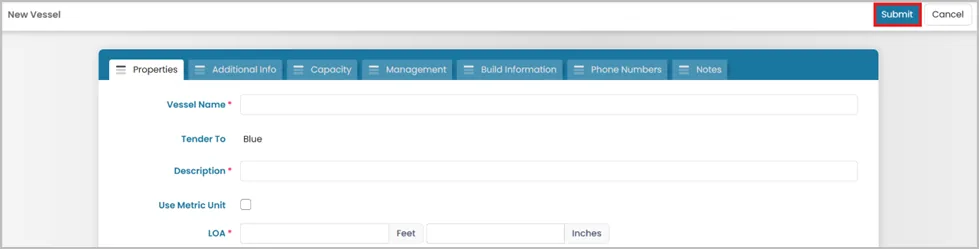
Tender has limited functionality and is linked directly to a main vessel.
Create Tasks, add Equipment, manage Vendors, Inventory, and Contacts.
- Documents: No separate Mandatory Documents list. Add tender documents under the parent vessel’s General Documents. For mandatory documents, add under the main vessel and name clearly (e.g., “Tender – [Document Name]”).
- Crew Management: Not available
- Trips & Guests: No separate functionality
- Other Modules: No individual functionality
Billing: Adding a vessel as a tender will not incur any charges. However, if it is added as a sub-vessel, it will be billed and counted as part of your subscription.
Which should I choose?
- Sub-Vessel — the added vessel has its own crew, documents, and operations to track
- Tender — the added vessel is auxiliary (e.g. a jet tender, RIB) and doesn't need its own module set
Was this article helpful?
Still need help?
Our support team will pick it up as a support ticket and reply by email.