
Save the MMV app to your phone or tablet home screen so you can open it like any other app, without typing the address every time.
Saving the MMV App to your phone or tablet home screen
- Open the Safari browser on your iOS device and enter the URL: app.managemyvessel.com.
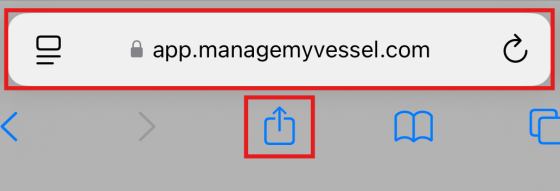
Safari address bar showing app.managemyvessel.com with the Share icon highlighted - Tap the Share icon.
- Select Add to Home Screen.
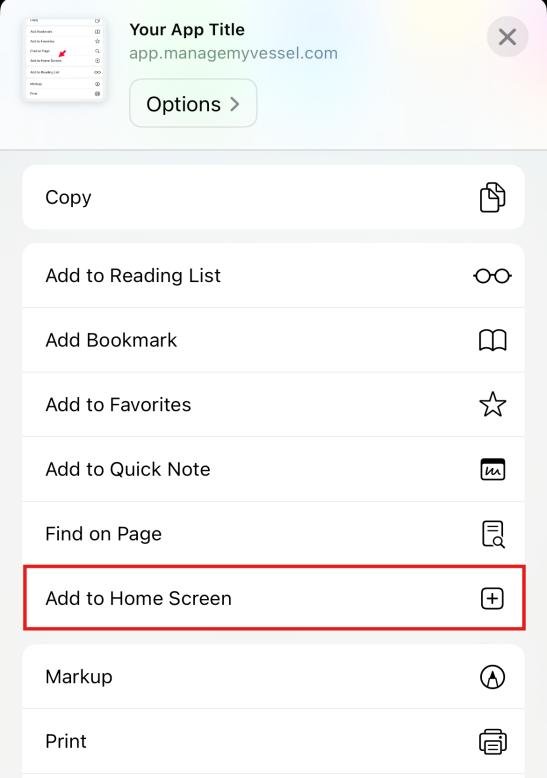
Safari share menu with Add to Home Screen option highlighted
Common questions
Do I need to download anything from the App Store?
No. The MMV app is a web app — you access it through your mobile browser and save it to your home screen. There is nothing to install from the App Store or Google Play.
Can I use this on Android as well as iOS?
Yes. The steps shown use Safari on iOS, but you can do the same thing on Android using Chrome's "Add to Home Screen" option from the browser menu.
Was this article helpful?
Still need help?
Our support team will pick it up as a support ticket and reply by email.