
The IMO Guests List is a standardized document used to record the details of all guests or visitors on board a vessel. It helps vessel operators maintain an accurate record of non-crew personnel and supports compliance with reporting requirements established by the International Maritime Organization (IMO) and relevant port authorities.
The IMO Guests List typically includes information such as the guest's name, nationality, date of birth, identification document details, and embarkation and disembarkation ports. Keeping this information up to date helps facilitate vessel clearance, enhances onboard accountability, and ensures that authorities have an accurate record of all guests on board.
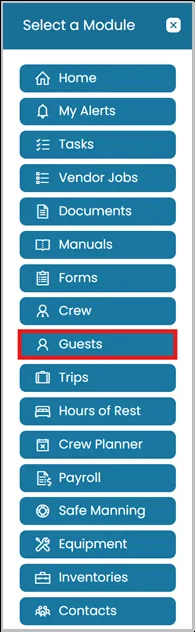
- Click the Modules icon and select Guests.
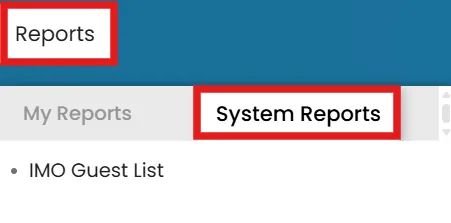
- From the Reports menu, select the System Reports tab, then click IMO Guests List.
- A pop-up window will appear.
Note: Ensure that pop-ups are enabled in your browser; otherwise, the report may not open.
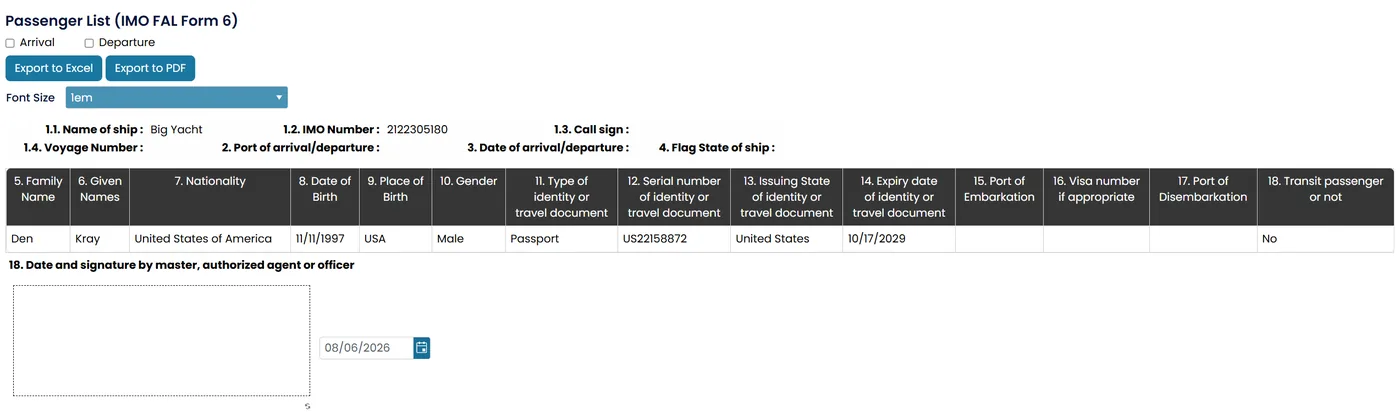
The IMO Guests List Report window includes the following options and information:
- Arrival / Departure – Select whether the report is for an arrival or departure.
- Export to Excel / Export to PDF – Download the report in your preferred format.
- Font Size – Adjust the text size for the exported or printed report.
- Vessel Details (Auto-filled) – Displays the vessel's name, IMO number, call sign, voyage number, port of arrival/departure, date of arrival/departure, and flag state.
- Guests List – Displays each guest's name, nationality, date and place of birth, gender, identification or travel document details, port of embarkation/disembarkation, visa number, and transit status.
- Signature Block – Provides space for the Master, authorized agent, or designated officer to sign and date the report.
Still need help?
Our support team will pick it up as a support ticket and reply by email.